5 October 2026
What Is WordPress?
About four in ten websites run on WordPress. We explain how its parts fit together, what it costs once plugins and upkeep are counted, and who it suits.
WordPress is a free, open-source content management system: the software that runs a website and gives you a dashboard for writing pages, publishing posts and uploading photos without touching code. It started in 2003, it is built on PHP with a MariaDB or MySQL database behind it, and it is licensed under the GPL, so anyone can download it, run it and change it without paying a licence fee. WordPress.org says it runs more than 43% of all sites on the web. W3Techs, which tracks this independently, put it at 40.2% of all websites in September 2026, and at nearly six in ten of the sites whose content management system it can identify.
WordPress.org is where the software lives: you download it free and install it on hosting you pay for, which is called self-hosting. WordPress.com is a hosting service that runs the same software for you, on plans that range from free to enterprise. For a business, WordPress means you own your content, you can move it to another host, and you can add almost any feature through plugins. It also means somebody has to keep every one of those pieces up to date. We are Seonat, a UK agency. Our earlier sites were WordPress, mostly built with Elementor, and nine of the 25 sites in our portfolio still ran on WordPress when we checked on 22 September 2026. Every site we have added to the portfolio since the start of August 2026 is coded instead, so we know WordPress from both sides.
The software is free. Running it well is not, because every part of a WordPress site is updated separately and someone has to own that job.
How WordPress works, in plain English
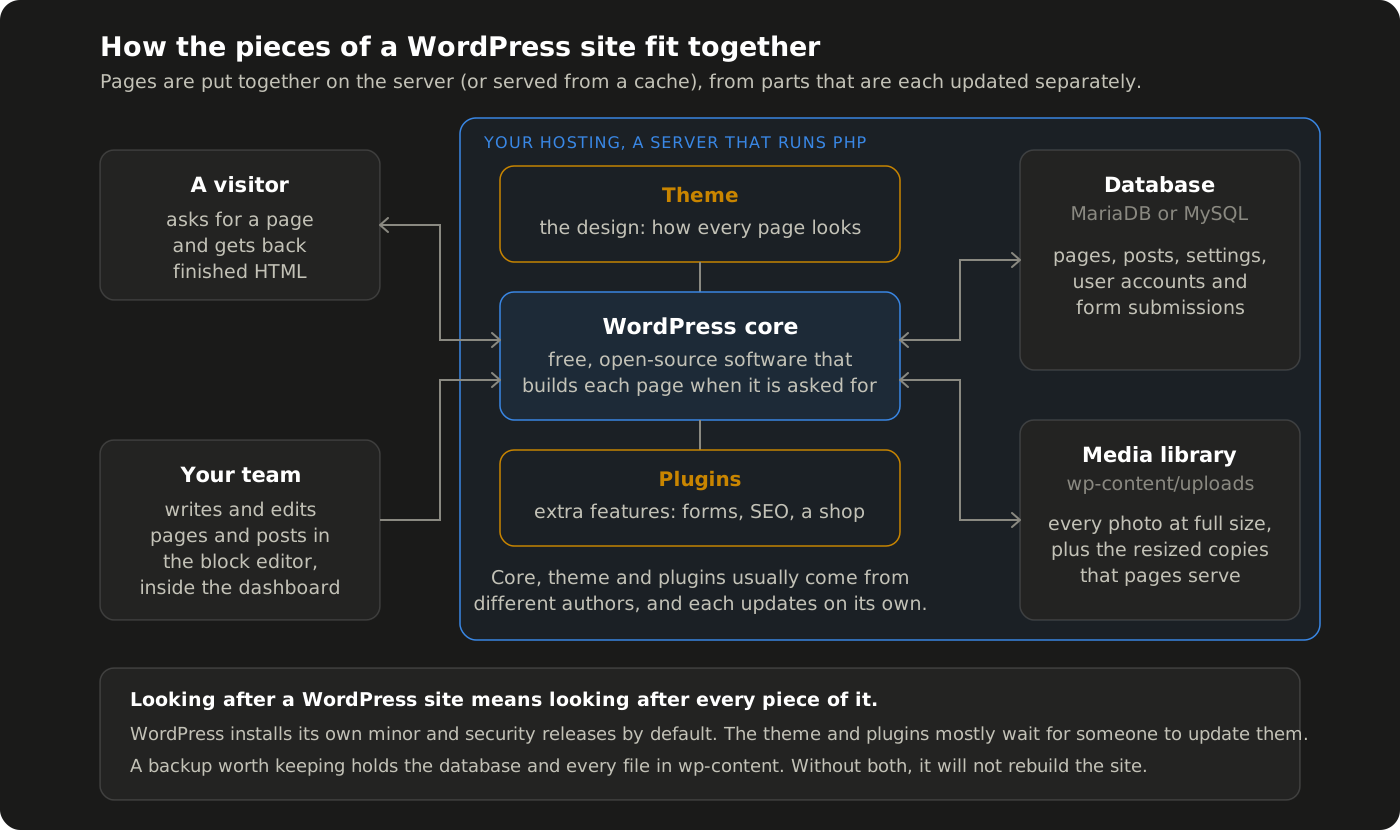
A WordPress site is a few separate parts working together.
Hosting is the server the site lives on, and it runs PHP, the language WordPress is written in. When a visitor asks for a page, WordPress fetches the words from the database and assembles the page there and then, unless a caching plugin or the host's own cache has kept a ready-made copy.
The theme controls how every page looks. Plugins add the features the core software does not have, such as contact forms, SEO tools or an online shop. The official directory alone lists over 73,000 free plugins, which is both WordPress's greatest strength and where much of its maintenance comes from.
The block editor is where the writing happens. It has been the default editor since WordPress 5.0 in December 2018, building pages from blocks for paragraphs, images, headings and more. Many sites add a page builder on top; our own builds mostly used Elementor on the Hello theme, with Yoast for SEO.
The media library is where your photos live: the files sit in a folder called wp-content/uploads, and the database keeps a record of each one. It holds every original next to the resized copies, named something like -1024x683, that pages serve.
What WordPress costs to run
The software costs nothing; everything around it does. As WordPress.com's own comparison puts it, with WordPress.org you download the software free, then pay a third party every year for hosting and your domain.
The costs that catch people out are the add-ons. Some of the best-known plugins and page builders are sold as yearly licences. Elementor's paid plans are billed annually and renew at list price, and WP Rocket's pricing page says its licence renews after a year so the site keeps receiving updates and support. None of that is unreasonable, but a site built on four or five premium plugins carries four or five renewals. Let a licence like that lapse and the plugin stops getting its fixes, which makes it a security question as well as a budget one.
Then there is time: somebody has to apply updates, check the site afterwards and keep backups. That is your time or a retainer, and it belongs in the budget from day one.
Keeping WordPress updated and secure
WordPress itself is well looked after. Since version 3.7 it has installed minor and security releases in the background on most sites, and fresh installs since version 5.6 move to new major versions automatically as well. WordPress 7.1.1, a maintenance and security release, came out on 17 September 2026, and a site already on 7.1 installs a release like that on its own.
Plugins and themes are different. By default they only update themselves in special cases, when the WordPress security team pushes a fix for a critical vulnerability. WordPress's own hardening guide says attacks usually either target known flaws, including old and outdated plugins, or try to guess passwords. Its advice is short: keep plugins updated, delete the ones you are not using, and install them only from the official directory or well-known companies.
WordPress looks after its own security releases by default. The theme and the plugins are the parts that wait for a person.
We have seen compromised installs up close. On one WordPress site we rebuilt, the contact page carried six injected gambling links. When we rebuild a site like that, an external link only comes across if it is on an approved list, and a crawl of all 137 pages after launch found zero spam links.
Is WordPress slow?
It does not have to be, but a heavily built one often is. On one page-builder WordPress site we rebuilt like-for-like, the largest element on the homepage took 4,424 milliseconds to appear, from 68 requests, against 792 milliseconds from 24 on our coded copy.
Most of that is weight. Every plugin can add its own scripts and styles, and page builders add a great deal of structure to each page. We have seen an Elementor homepage shipping 33 widgets that were hidden at every screen size: no visitor ever saw them, but every visitor downloaded them. Caching helps, often from the host rather than a plugin: on eight of the nine WordPress sites in our portfolio, the host keeps a ready-made copy of each page, so WordPress does not rebuild it for every visitor.
Being on WordPress does not hold a site back in search, either. One of our WordPress clients, a cardiology practice, went from around 500 to around 50,000 Google Search Console impressions a day, and from 10 to 150 clicks, after we rebuilt its technical foundations and restructured it around what patients search for.
Who WordPress suits
WordPress earns its upkeep when people actually use the editor.
Teams that publish their own content. One client whose WordPress site we rebuilt had been scheduling its own posts there, which WordPress does natively: set a date and the post goes out then. WordPress only runs its scheduler when someone loads a page, though, so on a quiet or heavily cached site a post can go out late. Yoast, the SEO plugin, also puts accurate last-modified dates in the sitemap by default. In our experience, WordPress works better than a coded site for a team that schedules its own posts, because scheduling is a date box in the editor, whereas on our coded builds we had to build scheduling ourselves and then fix live sitemaps we measured at up to 5.9 days out of date.
Small shops that want to run from the same dashboard. WooCommerce, the open-source shop plugin whose core is free, turns a WordPress site into a store. Worn UK, a UK streetwear and lifestyle brand, sells through the WooCommerce shop we built for it.
Businesses that want to be able to move. Self-hosted WordPress runs on any host that supports PHP and MySQL or MariaDB, so you can take it elsewhere.
It suits less well when nobody will edit the site. Our own old site was WordPress in name only: hand-coded HTML, CSS and animation pasted into Elementor's HTML widgets, so we were maintaining a content management system we barely used. On our coded builds, clients send us the change and we make it, so there is no editor to learn. Our guide to what Vercel is covers that approach and how we host it.
What we have learned from moving WordPress sites
By 22 September 2026 we had moved ten WordPress sites onto Vercel, our own included, and at least four of them were WordPress builds we had made ourselves.
Open the backup before you trust it. Before anything moves, we download the files and the database from the host and open the archive to check that the whole wp-content folder, uploads included, and a .sql database file are inside. The copy is kept for at least six months, and nobody cancels the old hosting until it is on our own disk. In our experience, the host's own full backup is the safer copy: twice we were handed a migration plugin's .wpress export that turned out to be missing the database, the theme or months of photos.
A backup nobody has opened is not a backup.
The media library holds more than the pages show. A crawl of the live site only finds the images pages use, mostly resized copies, and WordPress's Tools, Export, Media option lists the files rather than exporting them. Copy wp-content/uploads straight from the host.
Scheduled posts are invisible from outside. A post queued for next month is not on the live site, not in the sitemap and not in the Wayback Machine. Only the database has it. We found five on one move that no crawl would ever have seen.
Keep the addresses exactly as Google knows them. WordPress normally ends its addresses with a slash, and on most of our moves we have kept that slash, so pages that already rank go through no redirect at all. We have also found an old WordPress site answering on both the www and the non-www address, with no redirect between them, for years.
Tidy up after the move. Remove the old Yoast sitemaps from Google Search Console, and once nothing sends email through the old host, take it out of your email's SPF record. Check that your Search Console verification survived the DNS change, and copy across any image the new site still loads from the old wp-content folder, because it breaks the moment DNS moves.
Is WordPress right for your business?
If your team will write, schedule and publish its own content, or you want a small shop run from the same dashboard, WordPress is a sound and well-supported choice, as long as somebody owns the updates and the backups. If nobody will ever open the editor, you may be paying to maintain machinery you never use.
Either way, it is worth settling before any website design project starts. Get in touch and we will talk it through, including what to do with a WordPress site you already have.
Want this working for your business?
Tell us where you are now. We will come back with a clear picture of where you are losing ground online, and exactly how we would fix it.